


If you’ve ever spent 40 minutes recreating a document that already exists somewhere on your computer, you already understand the problem.
Manual document creation is one of those tasks that feels manageable until it isn’t. One hire, one contract, or one invoice at a time seems fine. Then the volume picks up, someone makes an error in a critical field, and suddenly the system that was “working fine” is visibly broken.
Most of the manual work involved in creating documents isn’t necessary. It’s just the default. There are practical ways to reduce that workload gradually, especially if you want to leave manual document creation behind entirely.
Document automation platforms like DoxFlowy make that transition a lot more comfortable. This guide covers both, so you can start wherever makes sense for your team and build from there.
Why manual document creation is a bigger problem than it looks

The obvious cost is time. The average employee spends a significant portion of their week on document-related tasks, and most of it is repetitive work that could be eliminated.
Get rid of manual repetitive paperwork with robust document automation
LEARN MORE
Creating the same contract with slightly different details, reformatting the same proposal for a new client, and retyping information that already exists in another system. These tasks add up quickly and quietly.
The less obvious cost is accuracy. Every time someone manually enters data into a document, there’s an opportunity for error. A wrong figure in a contract, a misspelled name on an offer letter, an outdated clause in an agreement. These mistakes don’t always get caught before the document goes out, and the consequences can range from embarrassing to legally significant.
The third cost is consistency. When documents are created manually by different people at different times, they rarely look or read the same way. Formatting drifts, language changes, and fields get added or removed.
Over time, your document library becomes a collection of slightly different versions of the same things.
The problem? No one is quite sure which one is the right one to use.
Start by defining what you’re creating
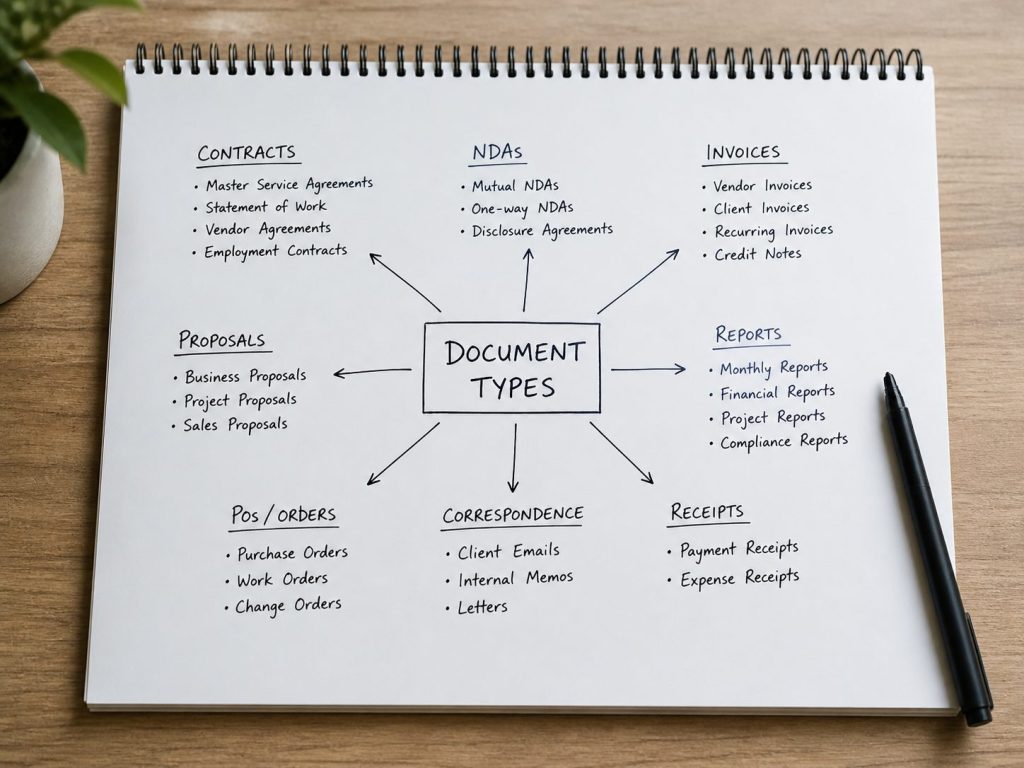
Before anything else, get a clear picture of what documents your team is producing and how often. Make a list. Contracts, offer letters, invoices, proposals, NDAs, onboarding forms, policy acknowledgments. Write down every document type that gets created more than once.
Then look at each one and ask: what changes between versions? Usually, it’s a small set of fields and clauses. Names, dates, amounts, roles, addresses. Everything else stays the same.
That distinction between what changes and what stays fixed is the foundation for reducing manual work. The parts that change should never be retyped manually. The parts that stay fixed should be written once and left alone.
This exercise also tends to reveal gaps you didn’t know existed. Documents that should be standardized but aren’t. Fields that different people fill in differently. Processes that live in someone’s head rather than in a defined system.
Surfacing these gaps before you change anything is important. Any solution you put in place will only be as good as the process underneath it.
Standardize your documents
The simplest reduction in manual work comes from standardization. Most teams are recreating documents from scratch or editing old versions because there’s no agreed-upon template to start from. Fixing this doesn’t require any software. It just requires deciding what each document should look like and making that version the one everyone uses.
Create a master version of each document type your team produces regularly. Agree on the structure, the language, and the formatting. Store it somewhere everyone can find it. This alone eliminates a significant amount of the time spent reformatting and rewriting documents that are functionally identical to ones that already exist.
Standardization also makes the next steps easier. A document with a consistent structure is much simpler to turn into an automated template than one that varies every time someone touches it.
Document and customer insights at your fingertips
LEARN MORE
Centralize where your documents live

A quieter drain on document efficiency is retrieval. When documents are scattered across inboxes, personal drives, and shared folders with no consistent naming or organization, finding a specific document becomes its own project. People recreate documents they can’t find, which adds to the manual workload and creates version confusion.
A centralized document repository solves this. Every document lives in one place, organized consistently and searchable when needed. Whether you use a dedicated document management system or a well-structured cloud storage setup, the goal is the same: one location, one source of truth, retrievable by anyone who needs it.
This also helps with version control. When there’s one central place where the current version of each template lives, people stop working from outdated copies, and the inconsistency problem starts to resolve itself.
Train your team on what already exists

A significant amount of manual document work happens because people don’t know that a better option exists. Someone creates a contract from scratch because they don’t know there’s a template. Someone manually transfers data because they don’t know the system can pull it in automatically.
Training your team on the tools and processes you already have in place is one of the fastest ways to reduce manual work without building anything new.
Make sure everyone knows where templates live, how to use them, and what the correct process is for each document type. Document the workflow. Who owns each template, when it was last reviewed, and what triggers each process.
This way, institutional knowledge doesn’t live in one person’s head. You mitigate key man risk. When that person is unavailable, the system should still be able to run.
Adopt a document automation tool
Once your process is defined and your documents are standardized, the next step is to automate the repetitive parts. This is where a document automation platform makes the biggest difference.
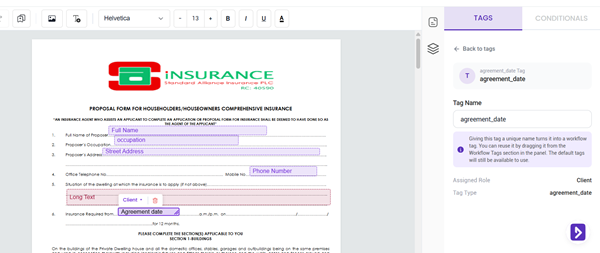
The core idea is simple. Instead of opening a document and manually editing the fields that change, you build a template once with dynamic fields that populate automatically based on submitted information. Instead of sending documents manually and following up when someone hasn’t signed, the system handles delivery, reminders, and storage on its own.
DoxFlowy is built for exactly this. You either upload your existing document or create one in the editor, replace the variable fields with tags, and connect it to an intake form that is generated automatically from those tags.
When someone submits the form, the document is created with all fields already populated and sent to the right people without any manual intervention.
Take advantage of AI-powered document drafting to move 4X faster
LEARN MORE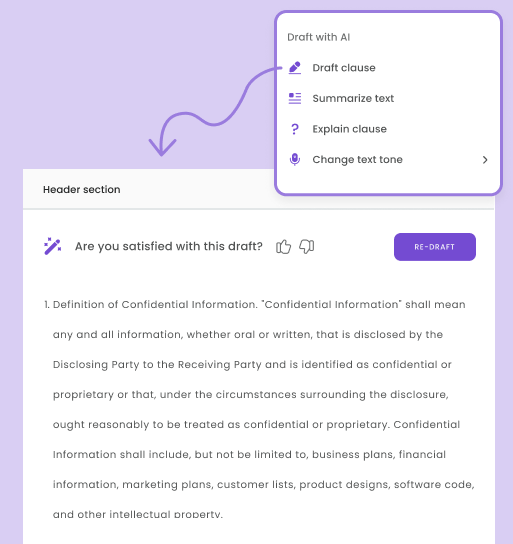
Conditional logic takes it further. A full-time hire triggers different clauses than a contractor. A client in one region sees different terms than clients in a different region. The document adapts to the situation based on rules you set once, without anyone opening it to make manual changes each time.
For teams already using tools like Salesforce, HubSpot, or an applicant tracking system (ATS), DoxFlowy connects to those systems so information flows directly into documents without manual data transfer. The document reflects what the source system says, not what someone typed from memory.
Once a document is signed, it’s stored automatically with a complete audit trail attached. Completed documents can be uploaded directly to your cloud storage, Google Drive, Dropbox, or similar, without a separate filing step.
What this looks like once it’s working
Before: someone needs a contract. They open an old version, edit the details, reformat anything that shifted, double-check every field, send it manually, wait, follow up, and resend. The signed copy ends up in an email thread somewhere.
After: someone submits a form. The document is generated with the correct information already in place, moves to the right people automatically, and gets stored with a full audit trail once it’s signed. The manual work is gone. The document still gets created. It just doesn’t require a person to do it.
The time savings are real. Teams that automate repetitive document workflows consistently report fewer errors, faster turnaround times, and hours reclaimed from administrative work every week.
If you want to see what that’s worth for your specific volume, DoxFlowy’s ROI calculator gives you a concrete number based on your usage.
Where to start
Pick the document your team creates most often. Standardize it, store it somewhere central, and make sure everyone knows it exists. Then take it a step further and turn it into an automated dynamic template in DoxFlowy.
Once it’s running and you’ve seen how much less effort it takes, the next one becomes straightforward. Start your free trial on DoxFlowy today and reduce the manual work in your document process.


