
What's New

You asked and we heard you. DoxFlowy has updated our pricing to better reflect the needed of our users and our growing capabilities.

Free Online Signature Maker
Type or Draw or Upload Signatures in Seconds.
This is as easy as it gets. Type your name in the field provided by our signature generator and choose from multiple handwriting fonts that are available. Make edits until you're happy with the final signature.
Use this online signature tool to draw a signature on any touchscreen device (mobile, tablet, or even a desktop/laptop connected stylus. Of course, you can use your mouse too. Our signature tool isn't picky.)
This is the perfect choice for you if you already have a signature and just need to digitize it. Upload your image as a PNG, JPG, or other common image format. We'll process it and then prepare it for download and your use.
Do you regularly sign documents online? Then you're in the right place. Get access to DoxFlowy Sign - our powerful and compliant electronic signaure software that'll help you sign legally binding documents in seconds.
As seen in:



What is an online signature generator - really?
A signature generator is just one of the names. Whether it's called a signature maker, signature creator, or something else, the function is the same.
It's a software tool that allows you to create a personalized signature that can be used for a variety of purposes.
At its core, the tool works by converting your input into an image file, typically a transparent PNG. If you choose to type your signature, the generator renders your name in a handwriting-style font and exports it as an image.
If you draw it, the tool captures your strokes on a digital canvas and saves that as an image. Either way, the output is a file you can insert into documents, emails, or forms.
Most often, the generated signature is used to eSign PDF or Word documents in a way that's legally compliant. In the United States, the ESIGN Act (2000) and the Uniform Electronic Transactions Act (UETA) establish that electronic signatures carry the same legal weight as handwritten ones, as long as all parties consent to conducting business electronically.
Similar frameworks exist in the EU (eIDAS), the UK, and most other major markets. Platforms like DoxFlowy, PandaDoc, or Signaturely will allow you to upload your generated signature and use it to sign everything from sales contracts to consent forms.
There are two broad categories of tools in this space. Standalone signature generators, like the free one above, let you create and download a signature image. That's where they stop. You're responsible for inserting that image into the right document and managing the signing process yourself.
Platform-integrated solutions go further. They handle the full lifecycle: creating the signature, embedding it in the document, routing it to the right people in the right order, collecting legally binding consent, and storing a tamper-proof audit trail.
The difference matters when you move from occasional personal use to regular business signing. A standalone generator works fine when you need to sign one PDF and email it back.
But when you're sending contracts to clients, onboarding new hires, or managing recurring agreements across a team, the manual steps between 'create signature' and 'signed document filed away' are where time disappears.
The free tool above does exactly that. But if you're signing documents regularly, or sending them to others for signature, you'll want something that handles the full workflow. That's where DoxFlowy comes in.
What a signature can reveal
Your signature says more about you than you might think. Here's what the experts say about different signature styles:
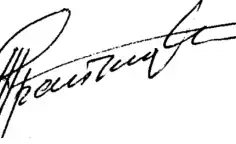
Ascending Signature
It can be said that people with an ascending signature indicate ambition, optimism, creativity, and vitality.
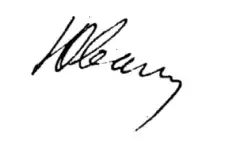
Descending Signature
Those with a descending signature can, in general terms, be considered skeptics.
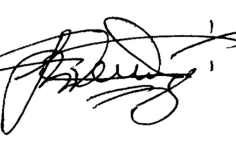
Large Signature
The larger the signature, the more confident the person tends to be.
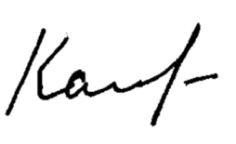
Small Signature
On the other end of the spectrum, those with small signatures may lack confidence.

Legible Signature
The clearer the signature the more open and straightforward they may be when dealing with others.
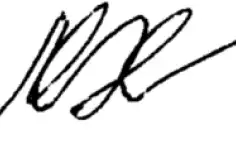
Illegible Signature
Conversely, a person with a signature you can't read doesn't mean they're not straightforward. It may mean they have a sharp or quick mind.

Initials only
This is considered to be a sign of an independent streak. A type of rebel.

Line after
A line right after the signature can be interpreted as someone who's determined.
How to create your online signature (3 ways)
Option 1: Use the free generator
Scroll to the top of this page, choose "Typed signature" or "Drawn signature," create your signature, and download it. Takes about 30 seconds. No account needed.
Option 2: Type your signature
Go to our type signature tool and enter your name. Pick from multiple handwriting-style fonts until you find one that fits. Edit the size and style, then download.
Option 3: Draw your signature
Go to our draw signature tool and use your mouse, trackpad, or touchscreen to draw your signature freehand. Adjust the color and thickness, then save.
Scroll to the top of this page, choose "Typed signature" or "Drawn signature," create your signature, and download it. Takes about 30 seconds. No account needed.
Beyond a signature maker. Sign your documents online in minutes.
A free signature generator handles one piece of the puzzle. But if you're sending contracts, onboarding new hires, or closing deals, you need the full workflow.
DoxFlowy Sign lets you send signature requests and collect legally binding signatures in just a few minutes. No more printing, scanning, emailing, or chasing people down.
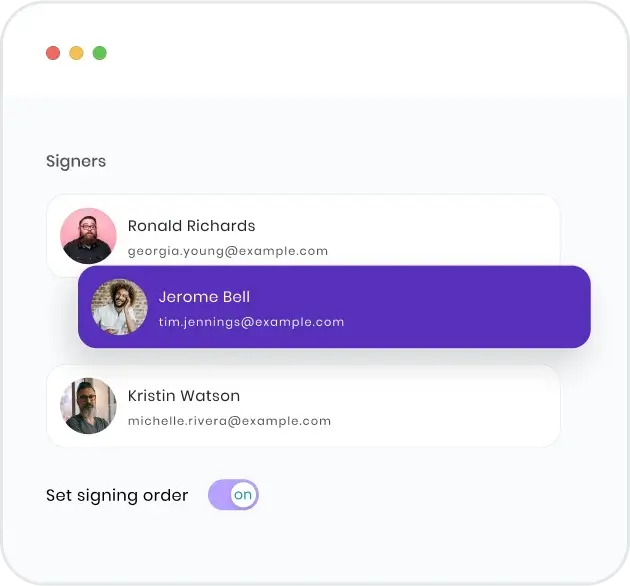
Set the signing order
Control who signs first, second, third, and so on to make sure the right signatures land on your document on time. No more coordinating multiple people over email.
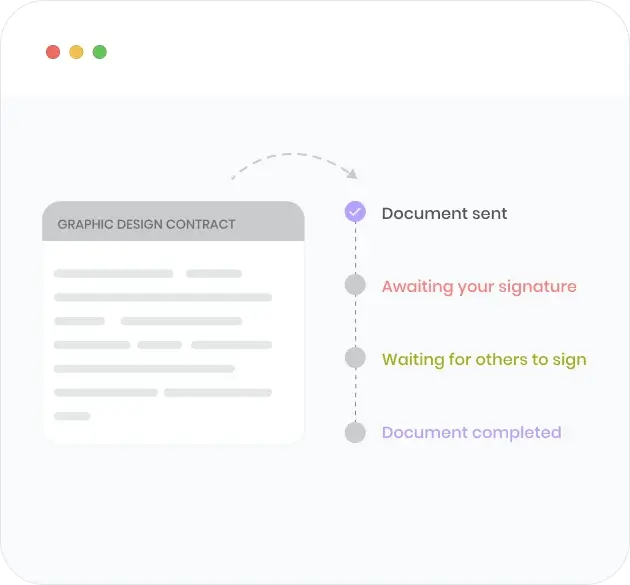
Signing progress at a glance
You don't need to follow up with anyone to understand if they've gotten the document, signed it, or are ready to send it back. Log in to your account and see the status of each signer at a glance.
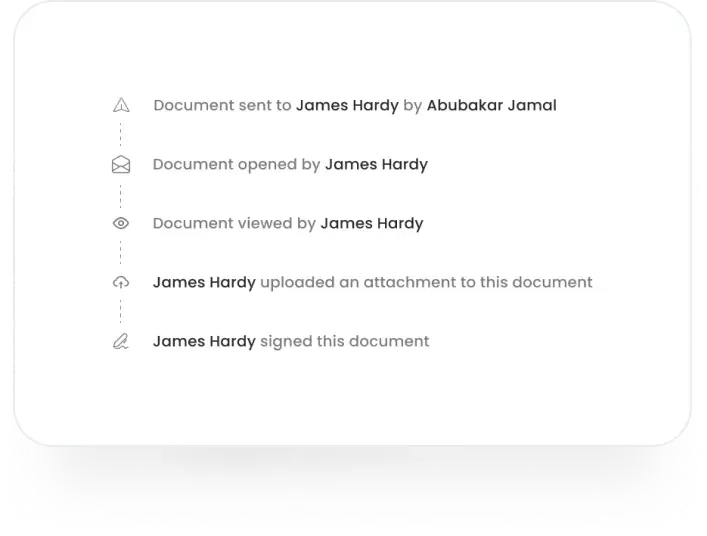
Know what happened at every step
A detailed audit trail lets you know when emails were sent, when the document was opened, when it was signed, and more. If there's ever a dispute, you have the receipts.
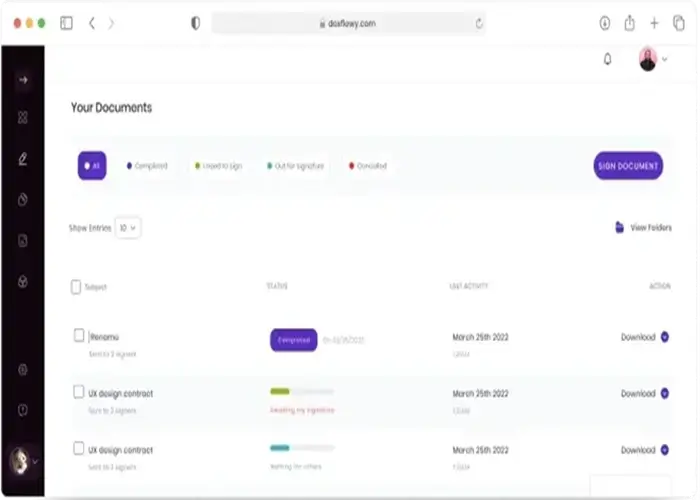
All your documents in one place
All your contracts, agreements, and other documents live in one central location. Filter, search, and organize to find the agreement you need. Never spend hours figuring out where you saved an important document again.
Who uses an online signature maker?
The short answer: anyone who sends or signs documents regularly. But some teams see a bigger impact than others.
If your team handles documents and signatures are part of the process, you're leaving time on the table without a tool like this.
The math is straightforward.
Individual users save one to two hours a day on document-related tasks like creating, sending, tracking, and filing. For an organization with 10 people handling documents regularly, that's 10 to 20 hours recovered every day.
At 5 users, the time savings are enough to free up the equivalent of one full-time employee. At 10 users, you're looking at two. Those people don't disappear. They get reassigned to work that actually moves the business forward instead of printing, scanning, chasing signatures, and filing paperwork.
The impact compounds the more document-heavy your operations are. A real estate brokerage processing 50 transactions a month, an HR department onboarding 20 new hires a quarter, a legal team managing 200 active contracts.
These aren't edge cases. They're the organizations where the ROI shows up in the first month.
Other signature generator tools
Frequently Asked Questions: eSignature maker FAQ
What's a signature generator and how does it work?
A signature generator is an online software program which produces an electronic signature that can be used in a variety of ways. It can be used as an email signature, to sign contracts, give consent in certain instances, and more. Like a regular handwritten signature, an online signature produced by a signature generator is legally binding.
Are my signatures stored in the signature maker?
No. Our signature generator is what's known as a front-end tool. That means almost everything happens in the browser and we don't store signatures in our database. After you download your signature and leave the page, the record of it is deleted. Learn more about how we keep your data safe here
What kind of signature is made with the signature creator?
Many people don't realize there are different types of electronic signatures. You have digital signatures and electronic signatures. Digital signatures use a security protocol called PKI (public key infrastructure). Before someone can have that, they need to go through an authentication process.
Our signature maker produces what's known as an electronic signature or online signature. This is also a legally binding signature but may not be used to sign certain government documents and property documents.
Is it possible to use the signature for legal documents?
Of course. The signature creator produces electronic signatures which are valid for many types of documents. In the United States, the ESIGN Act and UETA give electronic signatures the same legal standing as handwritten ones for most business and personal transactions. The EU follows a similar path under eIDAS, and most other major jurisdictions have equivalent laws on the books.
That said, not every document qualifies. Wills, certain court orders, and specific government filings often still require wet ink or notarized signatures, depending on your jurisdiction. For standard business documents like contracts, NDAs, offer letters, purchase agreements, and vendor forms, an electronic signature is fully enforceable. If you're unsure about a specific document type, check the regulations in your jurisdiction or consult with a legal professional.
How do we prove the legality of electronic signatures?
When you're using an electronic signature solution, the platform handles most of the legal groundwork behind the scenes. The key mechanism is the audit trail.
Every time a document is sent, opened, viewed, and signed, the platform logs the action along with the signer's IP address, timestamp, email address, and browser information. Some platforms, including DoxFlowy, also apply a cryptographic hash (a digital fingerprint) to the completed document.
If anyone modifies even a single character after signing, the hash changes and the tampering is detectable.
This combination of identity verification, timestamped activity logs, and document integrity checks is what courts look at when evaluating whether an electronic signature is valid.
It's also why using a dedicated signing platform matters for business documents. Sending a PDF with a pasted signature image doesn't give you any of this evidence. A platform like DoxFlowy creates the paper trail automatically, so if there's ever a dispute, you have everything you need.
Can any kind of document be signed with the signature from the signature creator?
Most documents can be signed but not all of them. For the ones you can sign, the executed document or contract will be legally binding and cannot be challenged in court because it's an electronic signature. The signatures made with our free signature generator shouldn't be used out the gate for:
• Last Will and Testament
• Power of Attorney
• Codicils and trusts
• Adoption paperwork
• Divorce decrees
• Court orders and notices
• Notices of default, foreclosure, repossession, or eviction
• Product recalls
• Documentation accompanying the transportation of hazardous material
How do you create an eSignature?
There are multiple ways to do that and all of them are easy:
• Use our online signature tool at the top of this page
• Choose whether you want to type or draw your signature
• Type in your name or draw it out based on the choice you made
• Download the electronic signature you just made
With this method, you'll be responsible for keeping the signature safe. Another method involves signing up for a DoxFlowy account and creating an eSignature that will be stored indefinitely.
How do you create a virtual signature?
A virtual signature is just another term for an electronic signature. To create one, you have a few options. The simplest is to use a free signature generator like the one at the top of this page. Type or draw your name, download the image, and insert it into your document manually.
For a more streamlined approach, use an electronic signature platform like DoxFlowy. Upload your document, drag a signature field to the right spot, and either draw, type, or upload your signature.
The platform saves your signature for future use, so you only need to create it once. From there, signing any document takes a few seconds. DoxFlowy also handles sending documents to others for signature, tracking who has and hasn't signed, and storing completed documents with a full audit trail.
How do you make a signature?
To make a signature, you can either sign your name by hand on paper or create a digital version. For a handwritten signature, use a pen to sign your name in a style that feels natural to you.
The interesting thing is that it doesn't need to be legible or even look like your name. What's important is that you can reproduce it every time you sign.
For a digital signature, use tools like DoxFlowy to draw, type, or upload an image of your signature, which can then be applied to documents electronically.
Both handwritten signatures and electronic signatures can be used to sign legally binding documents so use them carefully.
Do I need to keep paper records after signing electronically?
No, you don't need to keep paper records after signing electronically. Electronic signatures are legally binding and secure in most jurisdictions. The digital document itself, along with the electronic signature, serves as a valid and enforceable record.
Most electronic signature tools like DoxFlowy also provide a digital audit trail, which includes details like timestamps and signer identity verification.
This further enhances its legal standing. You may choose to store a digital copy for your records instead of a physical one.
What's the difference between a physical and an electronic signature?
The difference between a physical and an electronic signature lies in how they are created and used. In the eyes of the law, both of them are legally binding.
A physical signature is a handwritten mark made with a pen on a paper document. It's often considered personal, as it is unique to your handwriting. You would typically use it in face-to-face transactions, and the document must be physically handled and stored.
An electronic signature is a digital representation of your signature, created using tools like DoxFlowy. You can draw, type, or upload an image of your signature and apply it to digital documents. Electronic signatures are more convenient for remote or online transactions, allowing you to sign documents from anywhere. They are legally binding in many jurisdictions and often come with additional security features like timestamps or identity verification.
While both serve the same legal purpose, electronic signatures are more efficient for digital workflows, while physical signatures are more traditional and suited for paper-based processes.
Still generating signatures one at a time? DoxFlowy automates the entire document workflow, from creation to signature to storage. Start your free trial and see the difference in your first week.

Copyright 2023 - 2026 Useful Innovations, Inc. - All Rights Reserved
DoxFlowy is not a law firm, and does not provide legal services, advice, or representation. Some product imagery is for illustrative purposes only and the actual product experience may differ.

