
Real estate operations are often misunderstood as simple.
People assume the real work ends once you find a buyer and agree on a deal. But that’s just the beginning. There are contracts to sign, sheets to update, disclosures to review, and deeds to transfer. By the time a deal is closed, you’ve handled multiple documents that need to be accurate.
Real estate is high-stakes. It doesn’t leave much room for avoidable errors and requires multiple document processes that all need to be accurate.
Automation makes a real difference when your document process is structured and handled by a system that moves faster and with fewer issues.
In this guide, you’ll see how to automate real estate closing documents step by step, where most processes tend to break down, and how to set up a workflow that actually supports your deals instead of slowing them down.
Read more on overlooked benefits of automation.
Get rid of manual repetitive paperwork with robust document automation
LEARN MORE
So why automate your closing document process in the first place?
The most obvious answer is time.
Once you secure a buyer, their role becomes simple. They review and sign. But on your end, the work multiplies. You’re handling multiple documents, tracking progress, checking for errors, and making sure nothing slips through the cracks. This may take days to sort out.
A manual checklist may seem manageable at first, but it quickly becomes stressful and time-consuming. Your time is better spent analyzing deals, watching the market, or finding your next opportunity.
The issue is how the workload is structured.
Think about how it usually goes. You receive a large document bundle and go through it slowly, pulling out key details. Then you recreate documents, send them out, wait for responses, and follow up when people don’t reply.
Somewhere in that cycle, something gets overlooked because the process leans heavily on memory and repeated manual effort, and that’s where things start to break down over time.
There’s also risk associated with every step. A missing signature, a wrong figure in a disclosure, or a document buried inside a 120-page closing bundle can delay everything. These mistakes don’t usually happen because people are careless. They happen because the system relies too heavily on manual input and memory.
Automation helps steady that process. It takes over the repetitive parts so you can focus on the decisions that move the deal forward. With a tool like DoxFlowy, a lot of that manual tracking is handled in the background, so you’re not constantly double-checking yourself.
So what does automation in real estate look like?

Automation is a setup that reflects your existing process, just with fewer manual steps. You can think of it as a pipeline where documents move from data to creation, then to signing, and finally to storage, without constant input at every stage.
At a high level, the process starts with collecting data, usually through a structured form or intake step. That data is then used to generate documents automatically, which are sent out for signatures and stored once everything is complete.
When everything is connected, the workflow becomes a lot more predictable. That’s usually the point where people start to see the difference, especially when they’re managing multiple deals at once.
How to automate real estate closing documents: Step by step
Once automation is in place, the same workflow feels a lot lighter. The work still gets done, but it feels more structured and easier to manage. Here’s what it’ll look like.
Step 1: Extracting data without doing it manually
Start the process with an auto-generated data collection questionnaire. This approach is a single structured form that captures everything upfront. Buyer name, property address, loan amount, closing date, and entity type are collected in one pass.
Validation rules ensure fields can’t be skipped or filled in incorrectly. Conditional logic keeps it relevant, so a cash purchase doesn’t surface the same fields as a financed one.
By the time the questionnaire is submitted, the data is organized and ready. This way, you’re not pulling information from three different emails and hoping you got the right version.
Some document automation platforms, DoxFlowy included, generate this form automatically from your dynamic templates with the fields already mapped so you’re not building it separately.
Document and customer insights at your fingertips
LEARN MORE
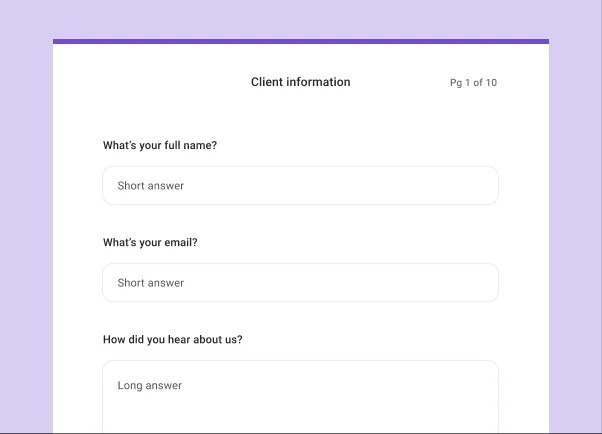
Doxflowy Form
Step 2: Creating documents without starting from scratch
Smart templates handle this. You merely need to build the document once, place fields throughout it, and tie those fields to the data collected in step one. When a new deal comes in, the documents populate automatically.
There’s also room for flexibility. Certain documents or sections can appear only when they’re relevant to the deal. Conditional logic handles the variability.
Where this gets particularly useful in real estate is when a closing package involves multiple documents. Rather than generating each one separately, a well-configured workflow produces the full package from a single submission. Purchase agreement, disclosure forms, addenda, all generated at once, each as its own document, ready to be sent together or individually.
Step 3: Letting documents move on their own
Automated signing workflows define the order upfront to ensure the process doesn’t slow down from the uncertainty of who hasn’t signed what.
One party completes their section, the next receives their notification automatically, and the process continues until everything is signed. Reminders go out on a schedule you set, and expiration windows are built in.
The result is full visibility without active management. You can see what’s been sent, what’s been opened, and what’s still pending. If something is stuck, you catch it early rather than the day before closing. This is standard in platforms like DoxFlowy, where document status across every active deal sits in one dashboard.
Step 4: Keeping everything accurate and compliant
A review step between document generation and sending gives you a checkpoint before anything goes out. You look at the generated documents alongside the submitted data, confirm everything is right, and approve. If something is off, the submission goes back for correction. Nothing moves forward until it’s been reviewed.
Once signed, every document should carry a complete audit trail (containing timestamps, IP addresses, etc) that shows the sequence of every action taken. If a transaction is ever questioned, you need a clear record of exactly what happened and when. Scanned PDFs in an email thread don’t give you that. A properly built document workflow does.
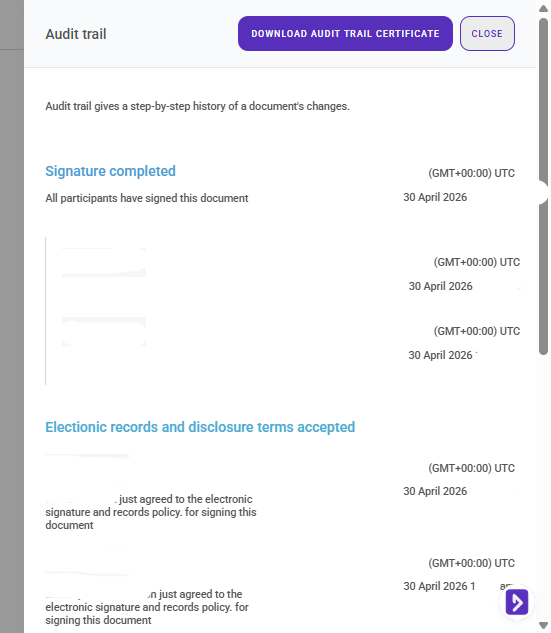
A DoxFlowy Audit Trail
Step 5: Where everything lives after closing.
If your documents are scattered across email inboxes, local drives, and shared folders, that retrieval process is slower and messier than it needs to be.
A central document repository solves this. Every completed document is stored in one place, organized, and searchable. Tools like DoxFlowy keep all finalized agreements in a built-in repository so that pulling up a completed deal later is straightforward, not a scavenger hunt.
For real estate specifically, where transactions involve significant sums and regulatory requirements, the infrastructure behind your document system matters too. SOC 2-compliant storage is what gives you and your clients confidence that the records are secure and retrievable when they need to be.
Take advantage of AI-powered document drafting to move 4X faster
LEARN MORE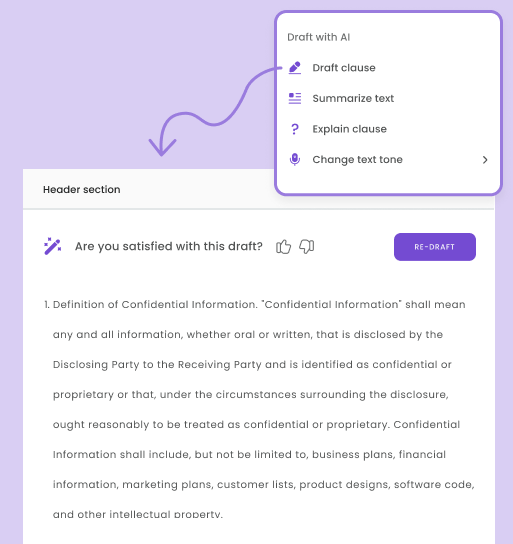
What this looks like in real life
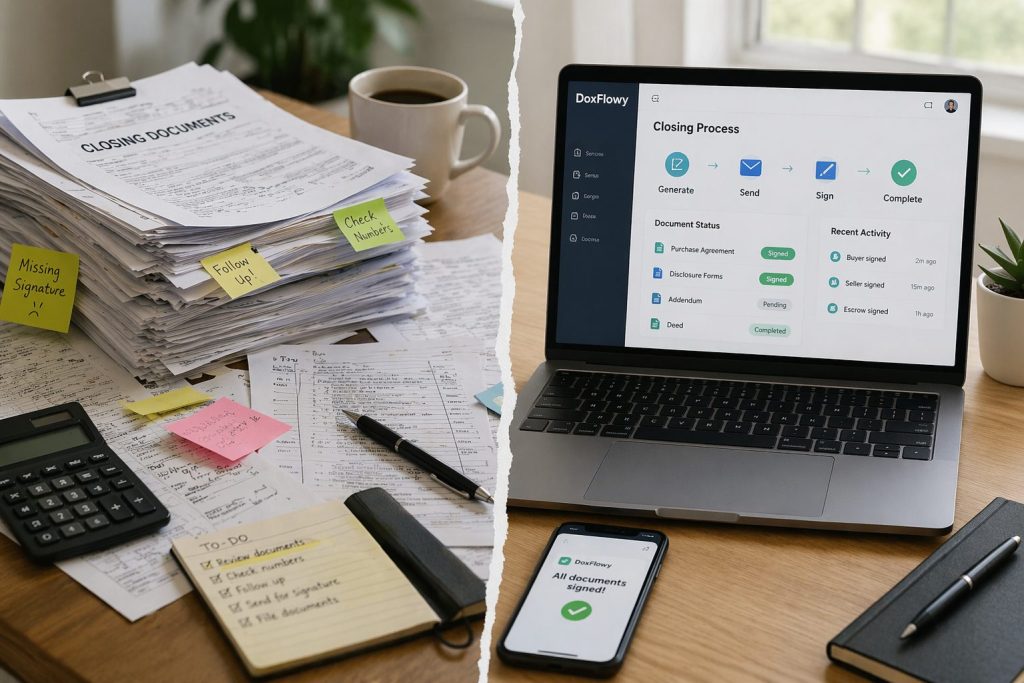
With automation, the flow becomes more direct. Documents are uploaded, data is extracted, new documents are generated, signatures are collected, and everything is stored in an organized way.
It’s the same deal, but the process feels a lot more manageable.
A few mistakes to avoid when getting started
Automation works best when it’s introduced gradually.
Some teams try to automate everything at once, which makes things confusing. Others rely on too many tools that don’t work well together. There are also cases where the process itself isn’t clearly defined before automation is added.
It helps to start with one part of the workflow, get it working smoothly, and then expand from there. Find other common mistakes to avoid here.
Doxflowy: The software that’ll help you close more deals
Real estate closings involve a lot of moving pieces. From purchase and sale agreements, title commitments, disclosure forms, and closing statements. Each deal requires the right documents, in the right order, with the right information. DoxFlowy lets you build that process once and reuse it.
Templates generate the full document package from a single form submission, conditional logic handles which disclosures are relevant to the deal, and a review step gives you a checkpoint before anything goes out to be signed.
Once documents are out, the signing workflow manages itself. Parties are notified in the order you set, reminders go out automatically, and everything that comes back signed is stored in a central repository with a full audit trail. Appraisal documents, loan approval letters, closing statements, all in one place, organized and retrievable when you need them.
So, how do I get started?
See how DoxFlowy handles the whole workflow, from data collection to signed agreements, in a single platform. Start today.