


Sending out offer letters to a new hire doesn’t seem like a big deal. Until it is.
It starts with opening an old document, tweaking and adjusting a few details on salary or start date, maybe fixing a clause or two. After double-checking and sending the form out for approval, you hope nothing has been missed.
It can be nerve-wracking.
That’s where automation comes in. It’s a way to let the process run on its own with fewer errors and less back-and-forth.
In this guide, you’ll see:
- What it means to automate offer letters
- What the process looks like in practice
- Tools for automating offer letters
What is an offer letter?
An offer letter is the document that outlines the terms of employment for a new hire. It usually covers the role, salary, start date, benefits, and any conditions attached to the job.
Get rid of manual repetitive paperwork with robust document automation
LEARN MORE
An offer letter It’sis one of the final steps in the hiring process, but it carries a lot of weight. If something is off here, it reflects badly on the company and can delay or even lose a candidate you worked hard to get.
What is automation (in this context)?
Automation here means setting up a system that handles the repetitive parts associated with creating and approving offer letters. Instead of manually editing documents, emailing files back and forth, and chasing signatures, the system does most of that for you.
Once it’s set up, the process follows the same path every time: collect information, generate the document, send it out, collect the signature, and store everything securely.
This set-up helps you:
- save time
- Improve brand consistency
- reduce errors
- gain visibility into what’s happening at every stage.
How to automate offer letters
Start with a template that does the heavy lifting
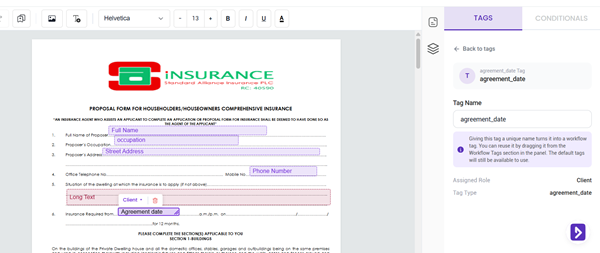
DoxFlowy’s PDF editor
The first step is turning your standard offer letter into something reusable. This starts with you uploading an offer letter as a document or creating one from scratch. Some tools provide templates to create your offer with.
When setting up your document, you decide what details go where. Instead of static text that you rewrite every time, you insert dynamic fields for things like salary, start date, role title, and benefits. When new information comes in, those fields populate automatically.
In DoxFlowy, this is handled through tags and roles. Roles define who interacts with the document, whether that’s human resources (HR), the hiring manager, or the candidate. Tags define where each piece of information that person entered goes.
You can upload your existing offer letter and build from there, start fresh using the built-in editor, or use our starter workflows. Either way, once the template is done, you stop rewriting offer letters and start running a system instead.
Add structure with approvals and logic
After an offer goes out, most companies need an internal sign-off. Automation lets you build that directly into the workflow. You define who needs to sign the document and in what order, and it moves through those steps automatically without anyone having to follow up manually.
Then there’s conditional logic, which is where things get more interesting. While setting up your roles and tags, you can also set rules that control which parts of the document appear based on specific inputs or ‘conditions’.
A full-time role shows certain clauses, while a contract role shows other unique clauses. For example, relocation benefits only appear when they’re relevant to the role. This keeps every document accurate by default, without requiring manual edits each time a situation changes slightly.
Connect everything to a form
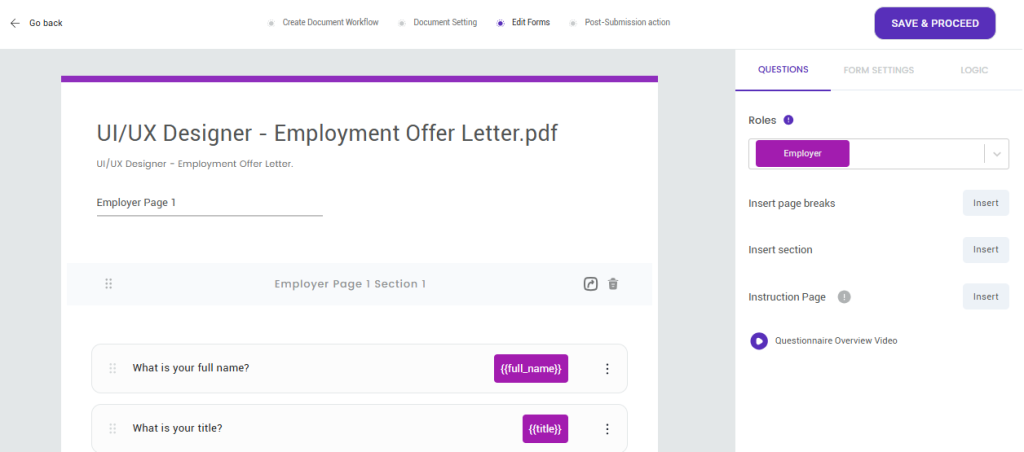
Editing forms on DoxFlowy
Once your template and logic are in place, everything ties back to a single intake form. Instead of collecting candidate details from scattered emails and chat threads, you gather everything in one structured submission.
When the form is submitted, the document is generated automatically. This is all achieved without repeatedly copying, pasting, or wondering if you pulled the right version of someone’s information.
Here, the process starts to feel genuinely different, and you’re no longer building documents one by one. You’re triggering them. DoxFlowy generates these forms directly from your template fields, so the data flows straight into the document without any extra setup on your end.
Document and customer insights at your fingertips
LEARN MORE
Send, sign, and track without chasing anyone
After the document is generated, it moves to signing. This part used to mean sending emails, waiting for responses, and following up repeatedly until something happened. Automating the process takes care of this hassle.
The candidate receives a secure link to their document. They can view it, sign it, and download a copy without needing an account or printing anything out.
You can define the signing order if multiple parties are involved and set automatic reminders.
Behind the scenes, you see exactly when the document was sent, opened, and signed. If something is delayed, you catch it early instead of the day before the start date.
What happens after signing matters too
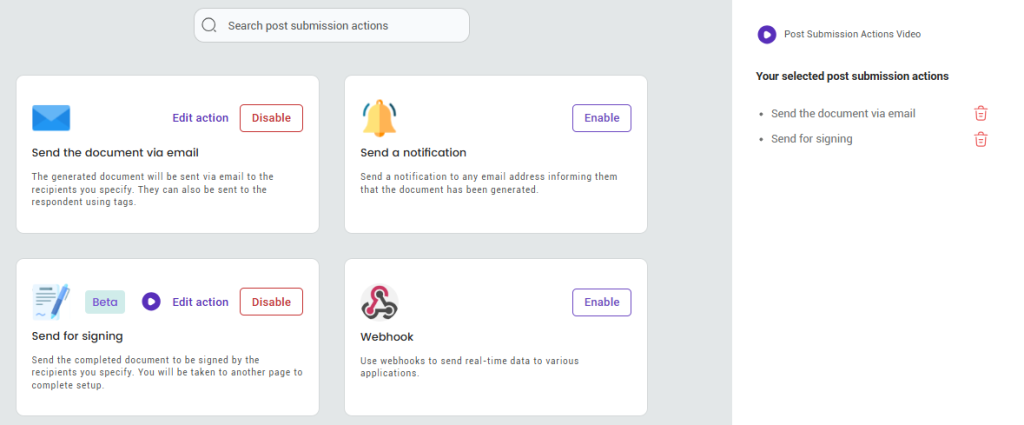
Post submission actions
Once the offer letter is signed, the process doesn’t stop there. A properly built system stores the document automatically and keeps a complete record of everything that happened.
Who signed, when they signed, and how the document moved through the workflow. This is called an audit trail, and while it might not feel important in the moment, it becomes very useful when you need to verify something later or resolve a disagreement.
It also connects directly to onboarding. When a candidate accepts, the system notifies the relevant team members, and things move forward without delays. That handoff from offer to onboarding is where automation starts to show its value, because it removes the gap where things tend to fall through.
Integrations
Integrations make the process feel seamless. They simply connect your document tool to the other systems your team already uses, like your applicant tracking system (ATS), your human resources information system (HRIS), or your customer relationship management (CRM) tool. Instead of jumping between platforms, everything starts to work together in one flow.
When these tools are connected, candidate data moves automatically. A hire gets approved, and the offer letter is generated with the right details already filled in.
Automating your offer letter with DoxFlowy
DoxFlowy handles the full workflow from start to finish. You’re collecting data through a structured form, generating documents automatically, routing them through approvals, collecting signatures, and storing everything in one place without needing to stitch multiple tools together.
DoxFlowy handles the full offer letter workflow in one place. You start by building a template with dynamic fields for things like role, salary, start date, and benefits.
Connect that dynamic template to an intake form, and when that form is submitted, the document generates automatically with everything already filled in. No manual editing, no copy-pasting, no version confusion.
Conditional logic controls what appears in the document based on the inputs. A full-time role shows different clauses than a contract role.
Take advantage of AI-powered document drafting to move 4X faster
LEARN MORE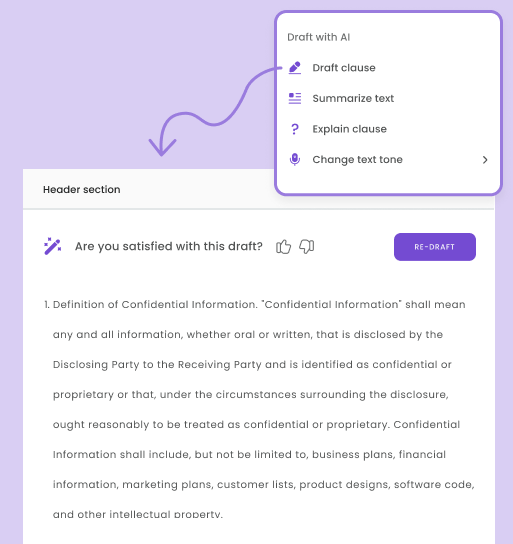
Relocation benefits only appear when relevant. Once the document is ready, it moves through a defined signing order automatically. The right people receive it at the right time without any manual input.
After signing, everything is stored in DoxFlowy’s built-in repository with a complete audit trail attached. You can see exactly when the document was sent, opened, and signed, and reminders go out automatically.
For HR teams that want the entire process to run without managing several platforms at once, DoxFlowy covers it from the first form submission to the final stored document.
It sits in the middle ground that most teams need. You get dynamic templates, conditional logic, automated signing workflows, and a built-in document repository without the enterprise price tag or the steep learning curve.
That’s a meaningful difference, especially for busy teams without additional capacity.
Where to start
Start small. You don’t need to automate everything at once, and trying to do so usually creates more confusion than it solves.
Pick one document. Your offer letter is a good place to begin. Turn it into a template, connect it to a simple intake form, and set up a basic signing flow. Once that’s working smoothly, expand from there.
Automation works best when it grows alongside your process, not when it tries to replace everything overnight.
Ready to simplify your hiring process?
Automation changes how much effort it takes to make things work consistently and correctly. Once that’s in place, documents won’t feel like tasks you have to manage.
Use DoxFlowy today and set up your first automated offer letter workflow.


