


As a business grows, there are more people in charge of delivering the products and services.
If everyone does what they want to do or what they think is best, the product and service quality suffer. That’s where standard operating procedures (SOPs) come into play.
An SOP is a set of documented step-by-step instructions used to perform regular tasks in a consistent manner. They’re instructions that reduce the variance in the activity and ensure a more uniform end product.
When using SOPs, quality remains consistent, human error is reduced, processes are performed faster, and compliance is easier.
In this guide, you’ll learn the process to create useful SOPs.
Step 1: Identify the Purpose and Scope of the SOP
Before you start writing an SOP, you need to be crystal clear about why it’s being created and what exactly it will cover. This step lays the foundation for the rest of the document and prevents confusion later.
Clarify the Goal
Every SOP has a goal. The goal will determine everything else about the SOP. Explain why the SOP is needed. Is it to comply with regulatory requirements, improve operational efficiency, standardize quality, or reduce training time?
Get rid of manual repetitive paperwork with robust document automation
LEARN MORE
With a clear goal, everyone can understand the value of the document and its intended outcomes.
Define the Scope
Set the boundaries of the SOP by specifying which processes, departments, or activities it applies to. This avoids overlap with other procedures and makes the document more focused. Explicitly note what’s included and what’s excluded so users know when to follow the SOP and when not to.
Align with Organizational Objectives
You don’t need to explicitly explain how the SOP aligns with the organization’s objectives, but it should be something that you keep in mind when creating it.
When an SOP is linked to your larger organizational goals, such as improving customer satisfaction or maintaining compliance, it gains more relevance and buy-in from employees and other stakeholders.
Example:
- Purpose: “To outline the steps for onboarding new employees in the HR department.”
- Scope: “Covers all activities from offer letter issuance to the first week of onboarding.”

Step 2: Gather Input from Stakeholders
After you have a specific purpose and a defined scope, you can get the right people involved. The people whom you enlist in the process should include those who are already performing the process or are directly impacted by it.
Process Owners and End-Users
Speak directly with the folks who perform or oversee the process daily. Their firsthand experience reveals nuances and edge cases that might otherwise be missed. This also helps secure buy-in, as people are more likely to follow a procedure they helped shape.
Collect Existing Documentation
Before reinventing the wheel, review any current guides, checklists, or policies related to the process. These resources can provide a starting point and highlight gaps or inconsistencies that need to be addressed within the new SOP you’re creating.
Ensure Accuracy
Stakeholder involvement is key to preventing outdated practices or incorrect assumptions from becoming formalized in the SOP. By combining current documentation with real-world input, you’ll create a procedure that reflects how the work is being done right now.
It’s common for existing documentation to be outdated, so view everything, even firsthand accounts, with a bit of skepticism. done today.

Step 3: Break Down the Process into Steps
When you’re done with Step 2, you can move on to structuring the SOP in a sensible way. This step is the core of the SOP, and the goal is to break down a complex process into manageable tasks anyone can follow.
Map the Workflow
Start by visualizing the entire process. Use flowcharts, diagrams, or process maps to show how each step connects to the next. This clarifies the sequence and helps identify bottlenecks, redundancies, or missing steps before writing the main SOP draft.
Identify Inputs and Outputs
Define what triggers the process (inputs) and what the end results should be (outputs). For example, an input might be “a signed client contract,” while an output could be “a fully set-up client account.” Clear inputs and outputs make it easier to create an SOP that is functional, concise, and produces measurable results.
Specify Roles and Responsibilities
Assign each step to a responsible person or team. This eliminates confusion about ownership and makes accountability explicit. For example, HR might handle sending offer letters, while IT prepares new employees’ workstations. Including these assignments keeps the SOP actionable and prevents tasks from falling through the cracks.
Example:
- Step 1: HR sends welcome email to new hire
- Step 2: IT prepares workspace
- Step 3: HR Schedules orientation meeting

Step 4: Choose a Consistent Format for the SOP
A well-written SOP goes beyond what’s written in it. It also includes how the information is structured and presented. Using a consistent format across all SOPs makes them easier to read, reference, and update.
Standardize Layout
Decide on a uniform style for your SOPs. Include consistent headings, numbering, fonts, and styles. This creates familiarity for employees and reduces the learning curve when they read multiple SOPs.
Put another way, it makes it easier to navigate the SOP and find relevant information contained therein.
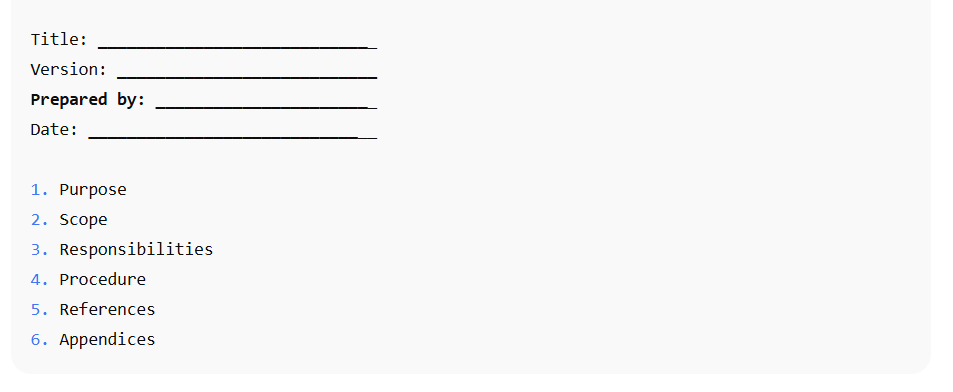
Include Essential Sections
Most effective SOPs share common elements. At a minimum, include sections like:
- Purpose
- Scope
- Responsibilities
- Procedures
- References or related documents
- Appendices (if needed)
This framework provides an easy way for the preparer to include the relevant information and makes SOPs easier to scan.
Make It Easy to Read
Use clear, concise language, bulleted or numbered lists, and action verbs (“Submit,” “Complete,” “Check”) so readers know exactly what to do. Consider adding visuals like icons, screenshots, or tables to break up long text and improve understanding.
Document and customer insights at your fingertips
LEARN MORE
Of course, not every SOP lends itself to visual elements, and that’s okay. Just make sure the formatting is easy on the eyes and the structure is in line with the established guidelines.
Step 5: Draft the SOP
Once your format and process steps are clear, begin writing the SOP in a way that’s practical and easy for users to follow.
Write in Clear, Direct Language
Use short, action-oriented sentences so employees know, in clear terms, what to do. Avoid jargon, marketing speak, abbreviations that don’t have a clear explanation, or overly technical terms unless absolutely necessary—and define them if you use them.
Follow the Chosen Structure
Stick to the consistent format you established in Step 4. Make sure all sections, Purpose, Scope, Responsibilities, and Procedures, are filled in accurately. When in doubt, ask for a second pair of eyes to make sure what you’re creating is clear and concise.
Be Specific and Clear
Include exact names of roles, tools, or systems used. Replace vague terms like “regularly” with specific timelines (“every Monday at 9 a.m.”). This eliminates guesswork and standardizes execution. This standardization is one of the greatest benefits of your SOP, so default to being clear over clever.
Incorporate Visual Aids
Add flowcharts, screenshots, or diagrams to illustrate complex tasks whenever possible. Visual references can create a massive improvement in understanding and reduce errors. As mentioned previously, this may not be relevant to every SOP you create, but try to incorporate it as much as possible. This is doubly true when the visuals won’t need to be changed often.
Example:
- Instead of: “The documents shall be reviewed by HR.”
- Use: “HR reviews the documents within 24 hours of receipt.”
Step 6: Review and Validate the SOP
Alright. You’ve created the first version of the SOP. You’re in a good place right now. Before rolling out the SOP, you’ll want to validate that it’s accurate, practical, and user-friendly.
There’s nothing worse than spending a lot of time on an SOP that breaks things, slows things down, or produces a subpar product.
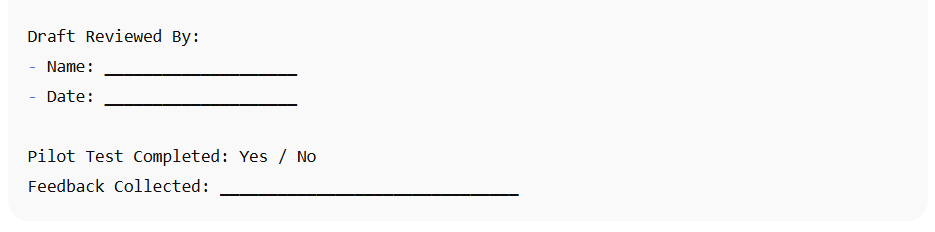
Conduct an Internal Review
Have process owners, supervisors, and subject-matter experts read through the SOP. They’ll catch inaccuracies, outdated practices, or unclear instructions that may have been missed during drafting.
Pilot the SOP in Real Conditions
Ask a small group of end-users to follow the SOP exactly as written. This live test helps identify steps that are unclear, missing, or impractical in day-to-day operations. Keep an open mind in this step. Some things may be technically correct but not ideal for real-world conditions.
Gather Feedback and Make Revisions
Use the input from reviewers and pilot testers to improve clarity, fix errors, and ensure all responsibilities and timelines are realistic. Make revisions promptly so the SOP reflects the most accurate version of the process.
Step 7: Train Staff on the SOP
Even the best-written SOP is ineffective if staff don’t understand or follow it. A lot of this can be taken care of through a properly written SOP, but some training is still required. Proper training ensures employees can confidently and consistently carry out the procedures described.
Develop a Training Plan
Decide how you’ll introduce the SOP to employees. This can be through workshops, on-the-job demonstrations, online modules, or quick-reference guides. Tailor the format to the complexity of the procedure and the roles involved.
If it’s not overly complex, online modules may suffice. If the work is very tactile, you may want to do it on-the-job or through workshops.
Provide Hands-On Practice
Let staff practice the process under supervision. Hands-on application cements understanding far better than just reading the SOP. This will also provide more information about where the SOP isn’t clear.
Use Clear and Accessible Materials
Offer job aids such as checklists, flowcharts, or short videos that summarize the SOP’s key points. This makes it easy for employees to refresh their memory later without having to wade through the entire SOP every time they forget something.
Take advantage of AI-powered document drafting to move 4X faster
LEARN MORE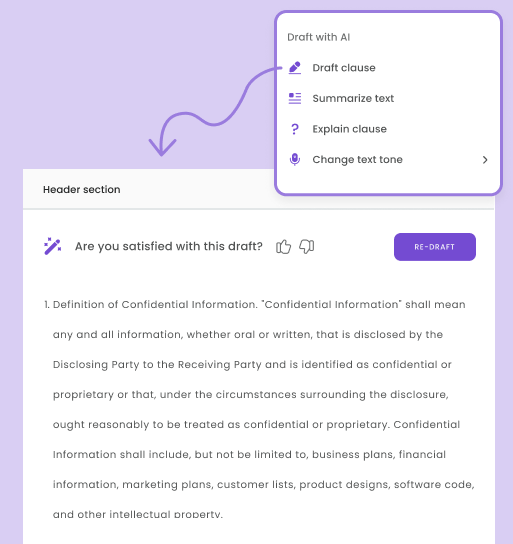
Assess Competency
Conduct short quizzes, observations, or practical tests to confirm that staff can apply the SOP correctly. Address any knowledge gaps immediately. Consider developing a minimum competency level and a way to test people. If they do not meet the requirements, then they continue training until they do.
Reinforce Over Time
Schedule periodic refresher training, especially if the SOP covers critical or high-risk processes. Regular reinforcement helps maintain compliance and consistency. This may also be an opportunity to collect real-world feedback about edge cases and other shortcomings associated with the SOP.
- Example: Host a 30-minute onboarding SOP review with HR staff.
Step 8: Implement, Monitor, and Update SOP
Once the SOP is in use, it’s essential to ensure it’s being followed correctly and remains relevant over time. Treat the SOP as a living document rather than a one-time effort.
Monitor Compliance Regularly
Use audits, spot checks, or performance metrics to see whether employees are following the SOP as intended. Collect data on errors, delays, or quality issues that may point to gaps in adherence or unclear instructions.
Encourage Feedback from Users
Frontline staff often spot practical issues or inefficiencies first. Create channels like feedback forms or quick check-ins for them to suggest improvements or flag outdated content. You can also make the feedback anonymous so people will be more willing to share without fear of silent consequences.
Schedule Periodic Reviews
Review each SOP on a set schedule (e.g., annually or biannually) or whenever there’s a major process, regulatory, or technology change. This ensures the document remains accurate, compliant, and aligned with business objectives.
Update and Communicate Changes Promptly
Revise the SOP based on findings and feedback. Communicate updates to all stakeholders and, if needed, provide refresher training to ensure everyone understands the new version.
Common Mistakes to Avoid
Overloading the SOP with Too Much Detail
Cramming in every possible scenario or excessive technical language makes the document overwhelming and hard to follow. Focus on clarity and relevance rather than exhaustive coverage. Use appendices for supplemental information if needed.
Ignoring Stakeholder Input
Leaving out the people who perform or oversee the process daily can result in unrealistic, incomplete, or impractical steps. Always involve process owners and end-users during drafting and review.
Failing to Update SOPs After Process Changes
An outdated SOP creates confusion, compliance risks, and operational inefficiency. Schedule periodic reviews and promptly update the SOP whenever processes, regulations, or technology change.
Conclusion
An SOP is an essential document, but it needs to be created thoughtfully, or it will do more harm than good.
This guide has outlined the eight steps required to make a strong SOP. The most important steps are identifying a purpose and scope for your SOP and continuous monitoring and updating.
Now it’s your turn. Create standardized operations, and when you’re confident, you can automate them using tools like DoxFlowy.
Let me know what you think in the comments, and don’t forget to share.


