

Software should feel good to use, not just get the job done. With this release, we gave DoxFlowy a top-to-bottom redesign. It extends from the first screen you see when you log in to the form your recipients fill out on the other end.
The goal was a more modern, faster experience for everyone the product touches. Two parts of the redesign stand out: much deeper workflow analytics, and a refreshed experience for the people you send documents to. Tying it together is a new dashboard that works like a real command center. Let’s walk through it.
A dashboard that acts like a command center
The old dashboard was a place to start something new. The new one is a place to run your day. The moment you log in, it shows you what needs your attention, grouped into clear cards: what’s awaiting you, what’s ready for review, what’s in flight with recipients, and what needs action.
Get rid of manual repetitive paperwork with robust document automation
LEARN MORE
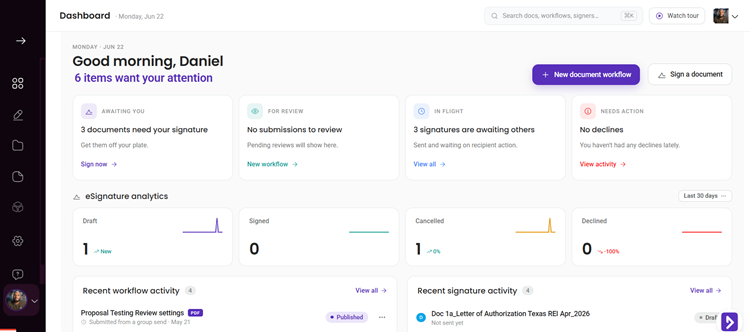
You also get eSignature analytics right on the dashboard, with a quick switch between the last 7, 30, or 90 days. You can also check through a custom time frame.
And there’s a global search, reachable with a keyboard shortcut, so you can jump to any document, workflow, or signer without hunting through menus. It is the kind of shortcut you use once and then cannot imagine working without.
One small change with an outsized payoff: the AI drafting entry point now lives one click from the dashboard. It used to be tucked away inside the editor, where plenty of people never found it. Now it’s right there, a single click from the dashboard into the editor, ready to help you draft. If you’ve leaned on AI-powered drafting before, it’s far easier to reach.
Workflow analytics that tell you more
This is where the redesign goes beyond looks. The document analytics page was rebuilt to show you what’s happening with every workflow, not just whether it’s done.
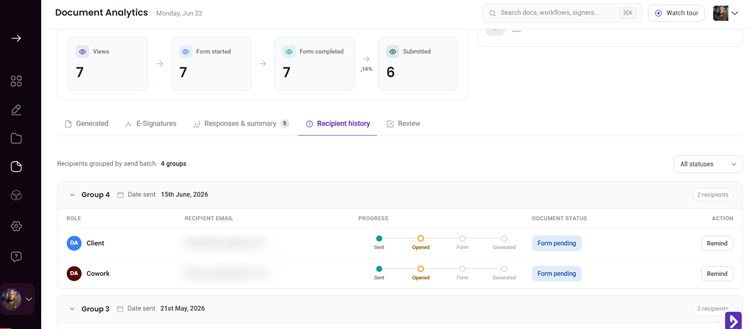
You get a full funnel: how many people viewed the form, how many started it, how many completed it, how many submitted, and how many are still pending. When the numbers drop off at a certain step, you can see exactly where, instead of guessing why a workflow stalls. That turns a vague sense that something is off into a specific step you can fix.
There’s more underneath. You can see time-to-complete, so you know how long your documents take. You get per-question response distributions, so you can spot the question everyone hesitates on. And dedicated tabs for generated documents and recipient history keep the detail organized and close at hand.
Follow progress in real time
Knowing more is only half of it. The redesign also lets you follow a workflow’s progress as it happens, with clear status indicators at each stage.
Recipient history now shows status pills that reflect the real state of things: awaiting review, awaiting resubmission, signed, and so on. As each stage completes, the status updates to match. When a signature finishes, the signed status reaches you, rather than leaving you staring at an in-progress label long after the work is done.
Document and customer insights at your fingertips
LEARN MORE
So you can answer the question every document sender asks a dozen times a day, where does this stand, with a glance instead of a guess.
The list pages got the same treatment
The redesign wasn’t only the dashboard and analytics. The pages you live in every day were refreshed too. My Workflows, eSign documents, templates, and signed documents all share a cleaner, more consistent look.
Practical touches make them easier to work with. There’s built-in search and filtering, a consistent pager so long lists are easy to page through, and row-level menus so you can rename, file, or act on an item without leaving the list. Little frictions you barely noticed before are simply gone.
A refreshed experience for your recipients
As we modernized the rest of the app, we couldn’t leave the form your recipients fill out untouched. It’s the part of DoxFlowy that your customers and signers see, so it carries your reputation.
The form already performed well, with no complaints, but it deserved the same care as everything else. You can still shape it with the instruction page and other settings you already know.
The redesigned flow is cleaner and easier to move through. It opens with a simple consent step (optional), followed by a welcome screen that sets expectations. The questions are laid out in clear steps with inline validation, so people catch a missed field as they go rather than at the very end.
Before submitting, they get a review step to check their answers, and a friendly confirmation once they’re done.
Take advantage of AI-powered document drafting to move 4X faster
LEARN MORE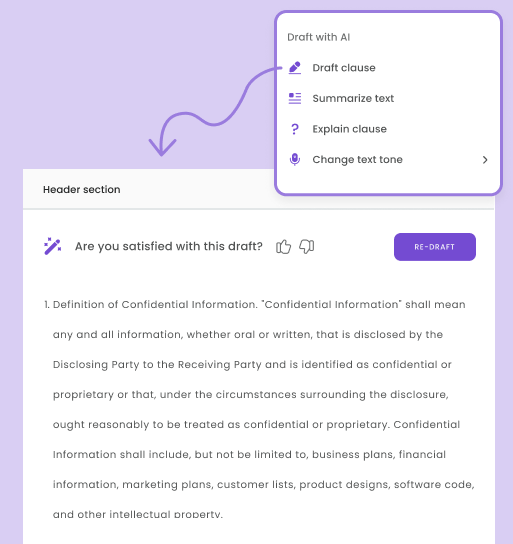
None of this asks anything new of your recipients. It just feels more modern and trustworthy, which is exactly what you want when someone is signing your document.
A confident signer is a signer who finishes, and a smoother form helps them get there.
Why this matters
A faster, clearer app saves you time on every single workflow, and those minutes compound. A more polished form makes a better impression on the people you do business with. And deeper analytics turn a black box into something you can manage and improve.
Put together, the redesign isn’t just a fresh coat of paint. It’s DoxFlowy doing the same jobs with less friction, more insight, and a better experience on both sides of the document.
Take a look
Log in and spend a minute on the new dashboard, then open a workflow’s analytics to see the funnel in action. For the full rundown of this release, read the DoxFlowy v2.0 roundup. Not on DoxFlowy yet? Start a free trial and see the new experience for yourself.


