

Imagine this: your HR team is onboarding three new hires this week. Each one needs an offer letter, an employment agreement, an NDA, a benefits enrollment form, and a handbook acknowledgment.
That’s 15 documents, and every single one needs the same basic details. They require names, roles, start dates, and salaries to be entered correctly.
Now imagine filling that information in once and having every document generated automatically.
No re-entry.
No copying between templates.
No wondering if someone typed “January 15” in the offer letter but “January 16” in the employment agreement.
That’s what multi-document workflows do. And it’s not limited to HR. Whether you’re closing real estate deals, onboarding vendors, or managing client agreements, if your process involves more than one document, this changes how your team works.
Get rid of manual repetitive paperwork with robust document automation
LEARN MORE
The Hidden Cost of “One Document at a Time”
Think about the last time you onboarded a new employee. Or closed on a property. Or signed a new client.
How many documents were involved? Three? Five? Ten?
Now think about how many times you (or someone on your team) typed the same name, address, company details, and dates into each one of those documents.
Separately.
Manually.
One at a time.
Every re-entry is a chance for a typo. Every copy-paste is a chance for outdated information to slip through.
And every minute spent filling out the same fields across multiple documents is a minute that could have gone toward something that matters.
Not saying documentation doesn’t matter. It absolutely does. We just spend too much time doing it.
For teams handling documents regularly, this adds up fast.
We’re talking 1 to 2 hours per person, per day lost to repetitive document work. In a team of 10, that’s the equivalent of losing two full-time employees to paperwork.
The worst part? Most teams don’t even realize how much time they’re bleeding because the waste is spread across dozens of small tasks throughout the day.
Why Single-Document Workflows Break Down at Scale
Most document automation tools solve a single problem well: they help you create or sign one document faster. And that’s fine when you’re dealing with a one-off agreement or a simple contract.
But business doesn’t run on single documents. It runs on packets, bundles, and workflows where multiple documents need to be created from the same set of information, reviewed by different people, and signed in different combinations.
You know. The barely controlled chaos that happens at every company.
When your tool only handles one document at a time, you end up building workarounds. You keep spreadsheets to track which documents have been sent. You copy data between forms. You follow up manually to make sure every piece got signed.
That’s not automation. That’s just digital paperwork. That’s not the goal.
Introducing Multi-Document Workflows
Multi-Document Workflows in DoxFlowy let you generate multiple documents from a single form submission.
Here’s how it works: you build a document workflow that includes every template you need for a specific process. Each template acts as a dynamic document, pre-mapped with tags that pull from a shared data collection questionnaire.
Document and customer insights at your fingertips
LEARN MORE
When someone fills out that questionnaire once, DoxFlowy generates every document in the workflow, automatically populated with the right information.
No re-entry.
No copy-paste.
No chasing down missing signatures across five different threads.
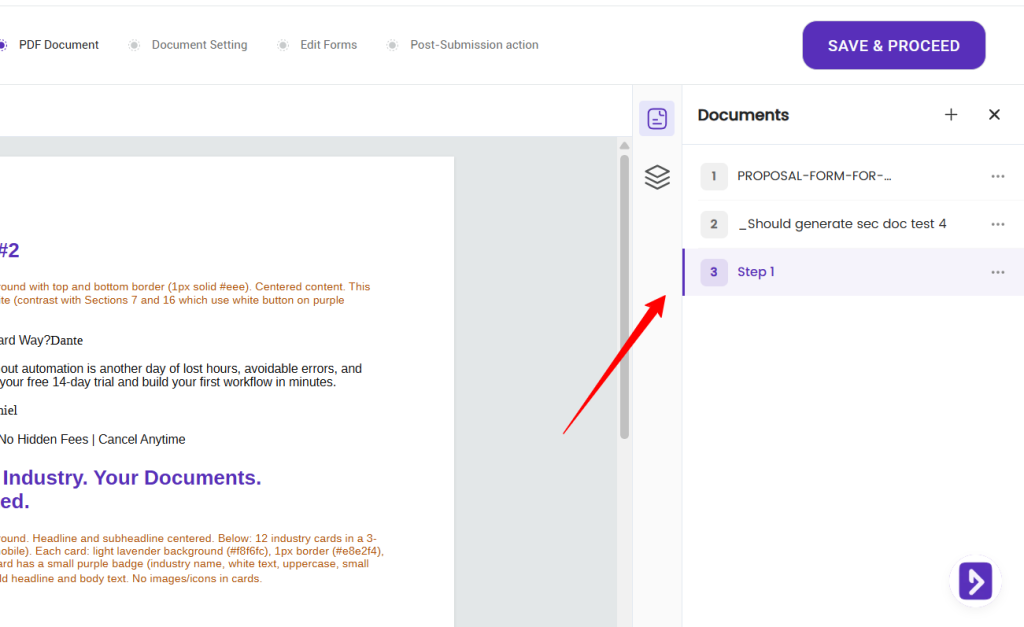
Set up signers once
You don’t define your signers and document roles over and over for each file. You set them once for the whole package, and they apply across every document in the workflow.
So if the same person signs all three documents, you add them one time. That alone removes a lot of repetitive setup, and it removes a lot of room for mistakes. Fewer fields to fill means fewer chances to fat-finger an email address and send a document to the wrong place.
Fill once, populate everywhere
This is where workflow tags earn their keep. A workflow tag can be reused across every document in the package. So a piece of information entered once, like a name or a start date, populates each document that needs it.
Your recipient types their name a single time. It lands on the offer letter, the NDA, and the tax form automatically. Less typing for them, fewer mismatches for you, and no risk of the name being spelled three different ways across three documents.
You choose the order of the questions
The flow your recipient sees isn’t locked to the order you uploaded the documents. When you edit the form, you arrange the questions however makes the most sense for the person filling them out.
Group the easy stuff first. Keep related questions together. Save the signature for the end. It’s flexible, so the experience feels like one smooth process rather than three documents stapled together at the last minute.
Download as a ZIP, or one at a time
When the workflow is complete, you have options. Download the entire package as a single ZIP file, or download any document on its own. Grab everything for your records, or pull just the one file a colleague asked for.
Naming is sensible by default. You rename the core file, the first one you uploaded, and the rest keep their original file names plus any tag that was appended. So your ZIP arrives organized, not as a folder of cryptic filenames you have to sort out later.
Key details:
- One questionnaire populates every document in the workflow. Fill it once, generate everything.
- No hard limit on the number of documents per workflow. Two documents or twenty, it’s your call.
- Download completed documents merged together or as a zip file.
- Each document can have its own signing workflow, so the right people sign the right documents.
- Every document benefits from the same security features you already rely on: immutable audit trails, password protection, and compliance-ready records.
Who Benefits Most From Multi-Document Workflows?
Real Estate Teams and Investors
A single real estate transaction can involve purchase agreements, disclosure forms, title documents, inspection addendums, and closing statements. That’s a lot of documents sharing the same buyer name, property address, and transaction details.
With multi-document workflows, a real estate team can set up a workflow for their standard transaction package. One form captures the deal details.
DoxFlowy generates every document, pre-filled and ready for the appropriate parties to sign. No more bouncing between five different templates or manually updating an address across a dozen forms when something changes.
HR and People Operations Teams
Onboarding a new hire typically means generating an offer letter, an employment agreement, an NDA, tax withholding forms, benefits enrollment paperwork, and a company handbook acknowledgment. That’s six or more documents per hire, all pulling from the same basic information: name, role, start date, salary, department.
Take advantage of AI-powered document drafting to move 4X faster
LEARN MORE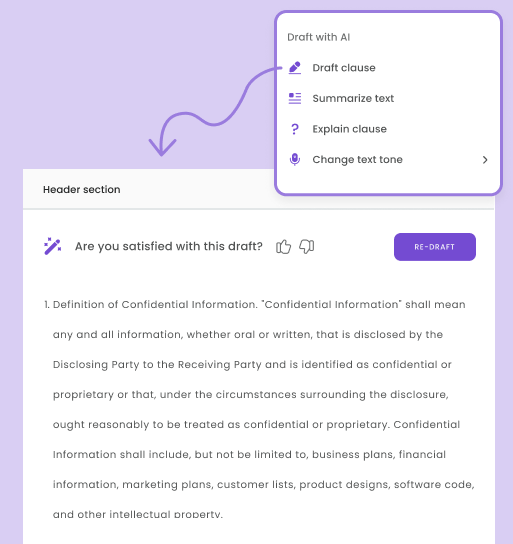
Instead of creating each document separately and chasing signatures across multiple emails, HR teams can build an onboarding workflow in DoxFlowy.
The hiring manager fills out one questionnaire, and the entire packet is generated and routed for signatures automatically. For a company that hires 5 to 10 people a month, that’s a meaningful amount of time returned to the team.
Legal Teams and Vendor Onboarding
Bringing on a new vendor or client often involves a master services agreement, a statement of work, an NDA, insurance verification forms, and compliance questionnaires.
Legal teams frequently deal with these bundles and the coordination overhead that comes with them.
A document workflow for vendor onboarding means the legal team sets up their standard package once.
When a new vendor comes in, the procurement or operations team fills out a single form. Every document is generated with the correct entity names, dates, and terms.
Each document routes to the right signatory. And the legal team has a clear audit trail for everything, which matters when compliance reviews come around.
The Practical Impact
For organizations with five or more people handling documents, the time savings compound quickly. If each person saves 1 to 2 hours a day on repetitive document work, a team of 10 effectively reclaims the capacity of two full-time employees.
That’s not a projection based on best-case scenarios. That’s based on how our customers actually use DoxFlowy.
Multi-document workflows don’t just save time on document creation. They reduce errors from manual data entry, cut down on follow-up emails, and create a consistent, auditable process that holds up when it matters.
Try It Multi-Document Workflows Yourself
Multi-document workflows are available now on all DoxFlowy plans. If you’ve been managing document bundles with manual processes and workarounds, this is the feature that replaces all of that.
View the full DoxFlowy 2.0 release here.
Start your free trial and build your first multi-document workflow today. If you have questions about how to set it up for your specific use case, our support team is ready to help.


